Overview*
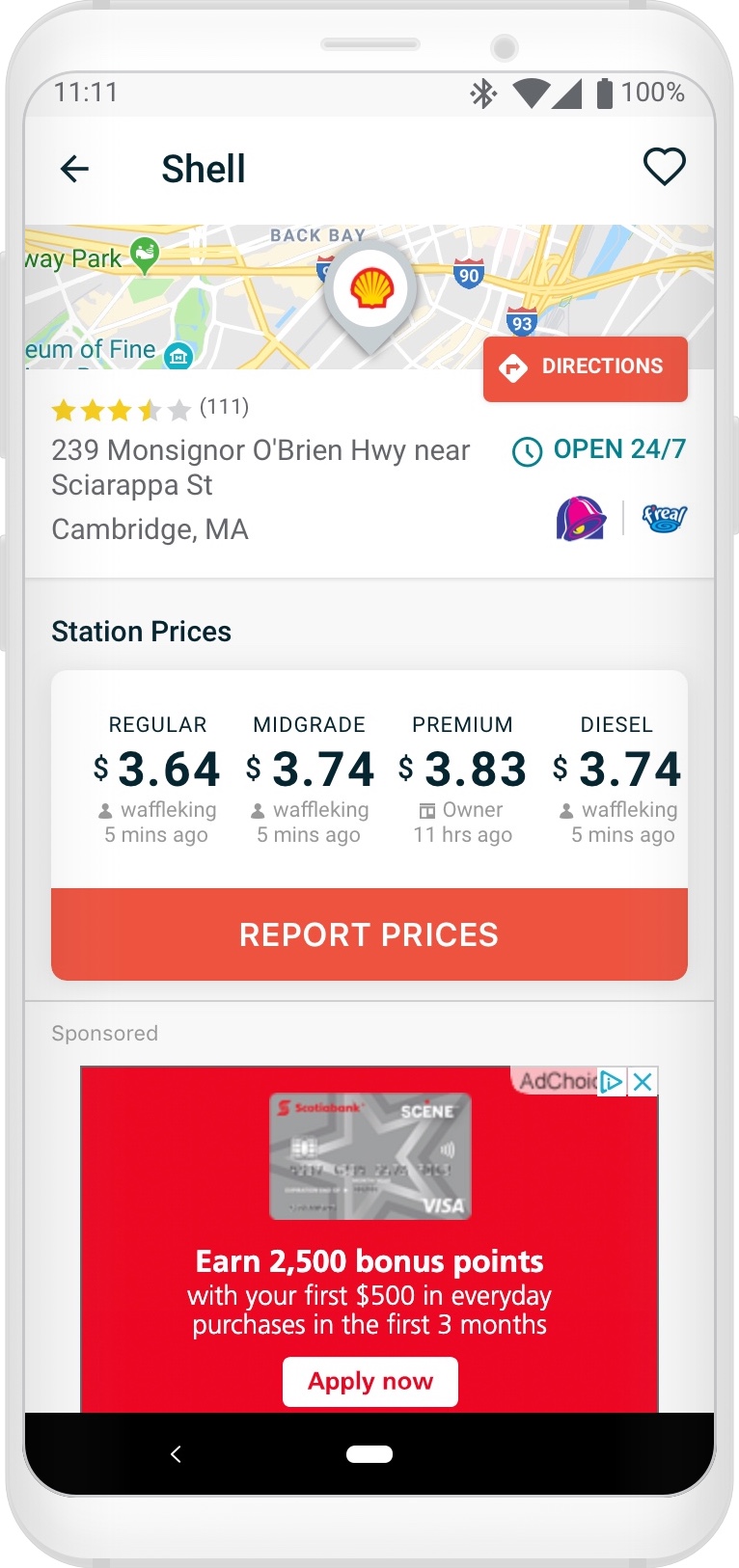
For this initiative I was tasked with augmenting and optimizing the station details screen layout to recover lost revenue and recover maximum ad viewability, without modifying the Deal Alerts and Dynamic Discounts UI on the station details screen, all while maintaining the same functionalities currently offered to the user.
*I take no credit for the “Before” designs outlined in this project.
Background
Some time after the introduction of the new Pay with GasBuddy Dynamic Discounts and Deal Alerts UI on the station details screen, the ad sales team had noticed the primary ad unit’s viewability and revenue weakening.
Identifying Problems ⚠️
When GasBuddy’s station details screen was redesigned for Deal Alerts and Dynamic Discounts, a few problems were presented.
The first problem:
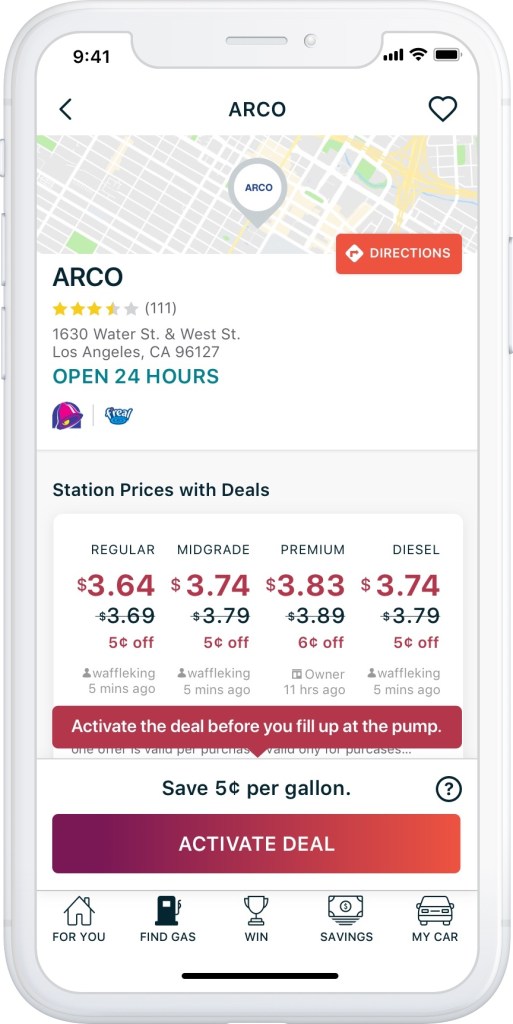
A) The implemented solution to describe an available discount for logged in Pay with GasBuddy users was increasing the vertical height of the “Report Prices” UI to show slashed pricing and the discounted amount, accompanied by a disclaimer in the Report Prices UI and floating discount UI. This both nudged any hint of the ad unit below the fold on most devices or covered the ad unit on most devices.
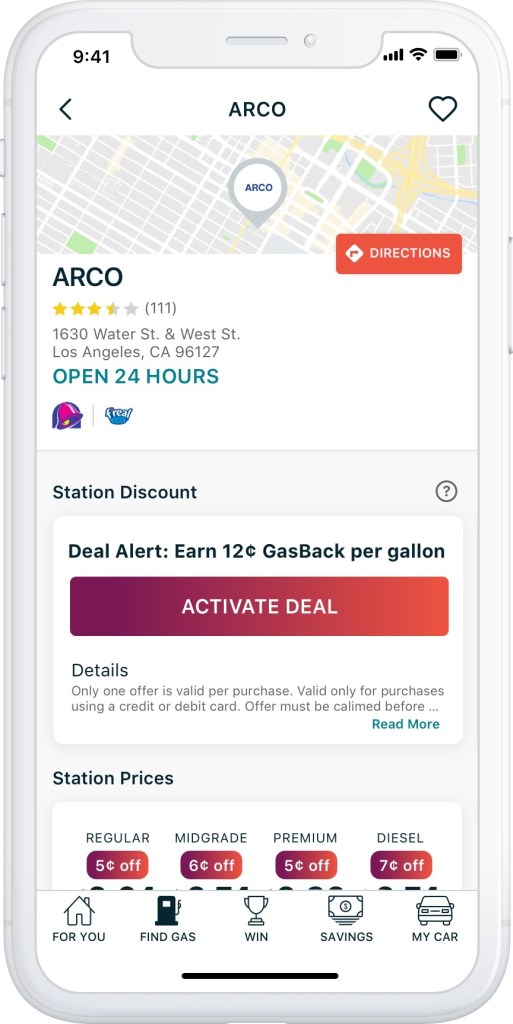
B) The implemented solution to describe and available discount for logged in non Pay with GasBuddy / logged out users was injecting a new card UI above the Station Prices UI, and adding an additional row to the Station Prices UI. This pushed the ad unit far down below the fold.
The second problem:
The implemented solution to communicate to the user they had activated a Deal Alert, how much time they had to claim that discount, and provide the window into uploading the receipt as proof-of-purchase was expand that floating UI, further decreasing the likelihood that the ad unit would be seen once the user returned to upload their receipt for both the Dynamic Discount and Deal Alert users.

The styling of this overlay has changed since this portfolio project was created. It is now significantly taller, with two CTA’s.
Viewability – Not as easy as 1-2-3
To benchmark this initiative from a monetary standpoint, I took it upon myself (with a little Q&A help from Ad Sales) to calculate the current state revenue based on the current state viewability to help build a concrete baseline to reference. It was important for me to know what the direct impact of the prior design decisions were.
Target Viewability: 70%
iOS Viewability: 30% (-25% relative from prior)
Android Viewability: 48% (-23% relative from prior)
Average Viewability between platforms: 39%
Hypotheses 🤔
We hypothesized that the above 18% difference in viewability between iOS and Android platforms was due to the iOS app persisting the bottom tab bar from either the Find Gas list or map views, ultimately absorbing some valuable vertical height, while Android — with far more variable screen sizes — did not.
We also hypothesized that the decrease in ad revenue could be attributed to Deal Alert and Dynamic Discount stations purposefully drawing more attention and traffic in the search list and map search views due to the way they were called out visually, resulting in more station detail opens where the ad unit was hidden or covered.
But after some careful inspection, I was able to estimate that although the Deal Alert and Dynamic Discount UI was contributing to missing the 70% viewability target, the default station details design (no deals, no discounts) was missing the mark which indicated that the introduction of new Deal Alert and Dynamic Discount UI was only a contributing factor to lost impressions, and not the root cause of degrading ad performance.
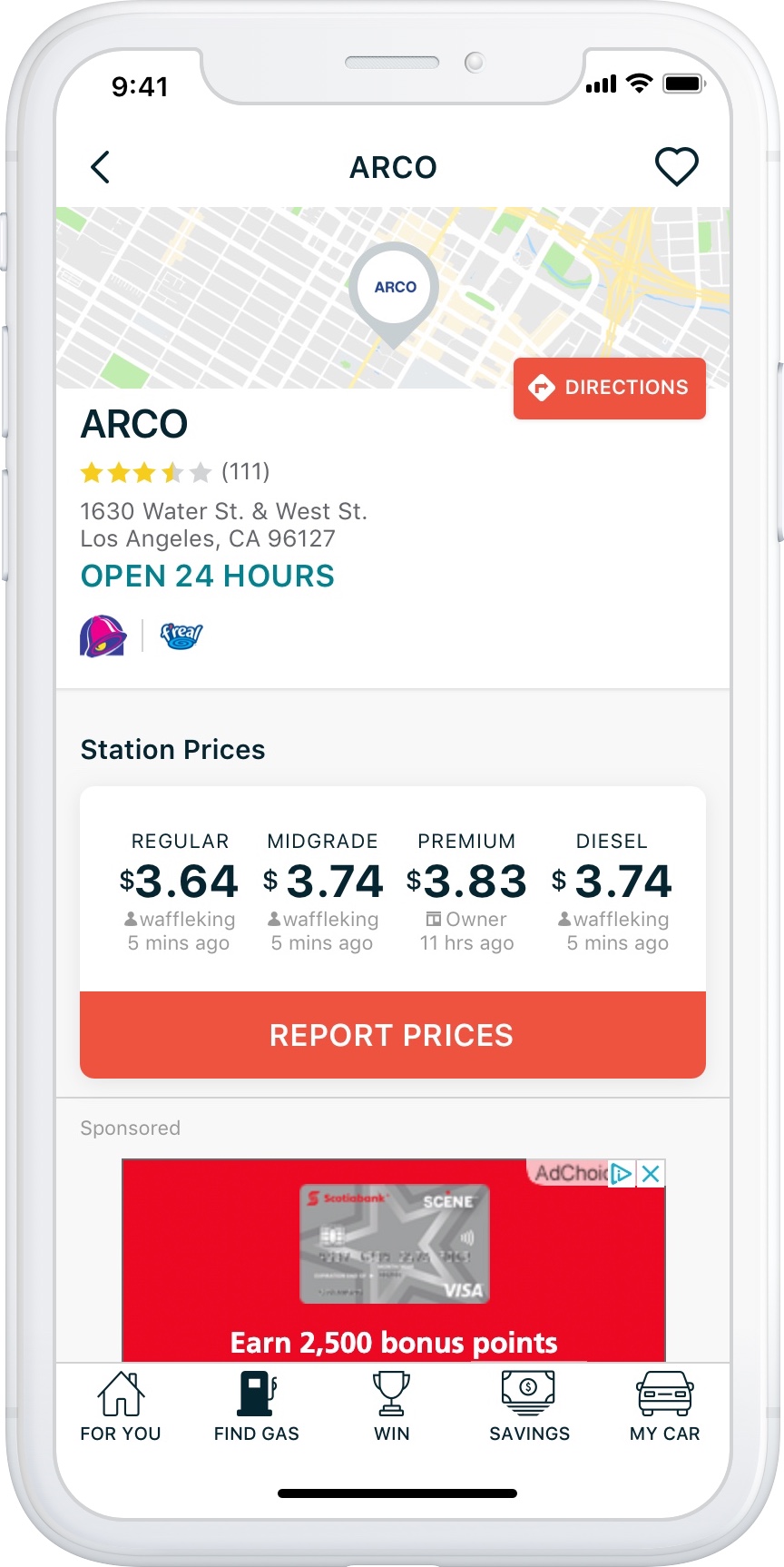
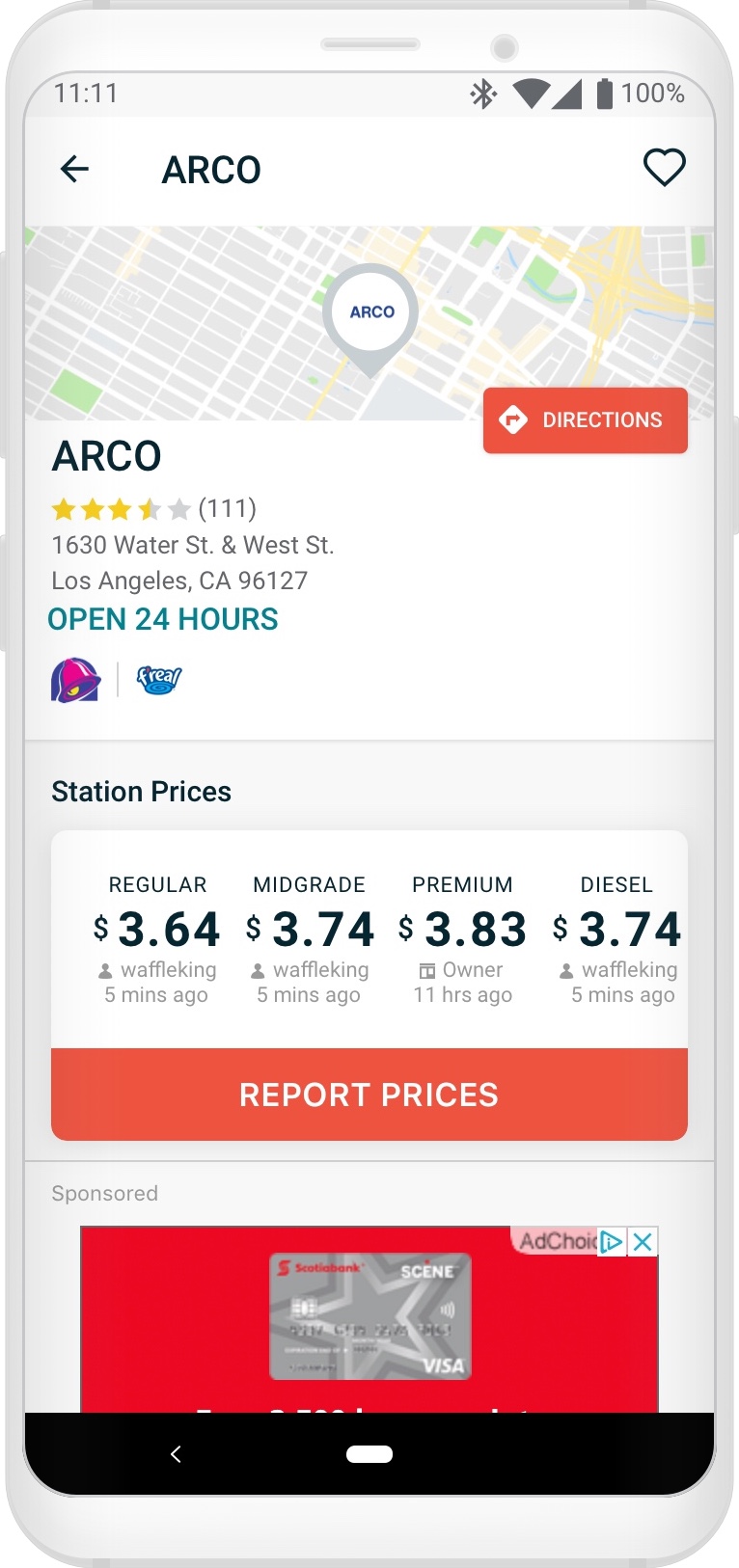
The iOS and Android station details screens (Default) before UI updates. We hypothesized that the Android app, with far more screen sizes and without the bottom bar, accounted for +18% viewability over iOS. A 300×250 ad unit is pictured, even on an iPhone X this ad is only 44% above the fold.
Shifting Focus 🧐
I realized we could net more impressions on more details screens on far more devices if we paid more attention to the default state of the details screen (no deals, no discounts), and not a minority subset of station details screens.
The focus shifted away from:
“How might we improve ad viewability on the Deal Alert and Dynamic Discount station details screens?”
… to:
“How might we improve the ad viewability for the default station details, while elevating the most important content on all variations of the details screen?”
Goal Identified 🥅
If I can get 300×250 ad inventory to show 51% above the fold for most devices — on more station details screens — subsequently showing 320×100 and 320×50 ad inventory entirely above the fold on most devices, we will see a major recovery in this ad unit’s performance.
The Design 📐
The initial design request was to move and place the ad unit above the Station Prices UI to ensure guaranteed impressions, however, this would look awful and be negatively received by our users, being as such I heavily advocated against this solution.
The existing design essentially used a stack view, showing several items in the left side of the details layout, which could — but not always — show:
- Station Name (also shown in the screen title bar)
- Convenience Store Name (dual branding, if applicable – not pictured)
- Station Rating
- Station Address
- City, State/Province, and Zip or Postal Code
- Station Hours
- Badge Ads (if applicable)
- Distance Off-Route (if applicable – not pictured)
This stack-view generated an impressive amount of white space on the righthand side of the details layout where the only a portion of the Directions button was partially overlaid.
Considering the above, my immediate focus was on eliminating redundancy and reducing negative space:

Notice that all the variable station info below the map stacks on the left side, rendering a substantial amount of negative space to the right.
With the current design audited and the goals clearly set, I began to augment the station details screen resulting in the following design changes:
- Decrease the height of the map from 100px to 75px
- Remove the larger, redundant title from the details stack
- Remove the dual branded c-store name from the details stack
- Keep the station name in title bar
- Dual branded c-store name will be appended to station name in title bar with an “&” (if applicable)
- Station Hours button label (if applicable) was decreased from a Tertiary button style to a Quaternary style, and re-positioned below the Directions button
- Badge ads (if applicable) were positioned below the station hours, bottom aligned to the City, State/City, Province label
- Allow for station addresses to extend to, and truncate at the left edge of the DIRECTIONS button if the station has hours
- Allow for addresses to extend the full width of the screen if the station does not have hours
- Additional internal testing resulted in discovering that, although the Zip/Postal code was part of the station address, people completely missed this details even being there. So after some careful consideration, this was removed – as to not conflict with newly positioned badge ads
All in all, these changes essentially decreased the station details default layout height, below the title bar, from ~265px to ~160 px (no station hours, single lined address – 40% shorter) or from 265px to ~185px (has station hours with a truncated double lined address – 30% shorter)
Before and After – Default State
iOS – Before 
iOS – After 
Android – Before 
Android – After
The above listed design changed allowed for 300×250 ads to show above the fold (meaning 320×100 and 320×50 ads shown entirely!)
Before and After – Dynamic Discounts (Logged In)

iOS – Before 
iOS – After 
Android – Before 
Android – After
The Dynamic Discount Deal Alert station details screen before and after UI updates. The big win here is getting more of the fuel price UI uncovered and above the fold!
Before and After – Deal Alert (Logged Out)

iOS – Before 
iOS – After 
Android – Before 
Android – After
The Deal Alert station details screen before and after UI updates. The big win here is also getting those prices above the fold!
The Final Results 🎉
iOS saw a 26% absolute increase in ad viewability from 30 to 56% (a 55% relative increase) – Not exactly 70% target viewability, but a respectable 16% absolute gain from the prior design.
Android saw a 24% absolute increase in ad viewability from 48 to 72% (a 71% relative increase) – Meeting and exceeding the 70% target viewability. and a 10% absolute gain from the prior design.
Final Combined Viewability: The iOS and Android apps saw a combined viewability jump from 39% to 64% — nearly double.

 Don Hancock